
Persiapan
1. USB Flashdisk berkapasitas minimal 4 Gb, Laptop/PC
2. Master Windows 7 atau Master yang sudah anda ISO.
3. Atur urutan posisi booting dengan memilih usb flashdik pada bios anda.
2. Master Windows 7 atau Master yang sudah anda ISO.
3. Atur urutan posisi booting dengan memilih usb flashdik pada bios anda.
Tahap 1
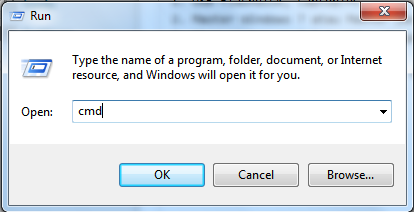
Nyakakan Laptop/PC anda, kemudian masuk ke command prompt.
1. Klik start-Run-cmd ok
1. Klik start-Run-cmd ok
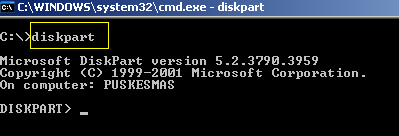
2. Kemudian ketik diskpart (enter).
3. Ketik list disk (untuk melihat daftar disk yang ada).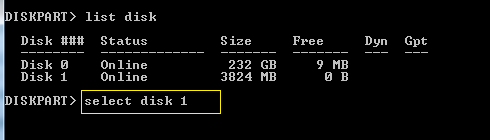
4. ketik select disk 1 atau select disk 2 tergantung posisi flashdisk. Anda bisa melihat dari ukuran size/kapasitas yang terlihat.
5. Ketik clean (enter).
6. Ketik create partition primary (enter).
7. Ketik format recommended lalu enter. (tunggu sampai proses format selesai)
8. Ketik active (enter).
9. Ketik exit (enter).
Tahap 2
1. copy master windows 7
2. restart laptop/pc (pastikan anda sudah memilih posisi urutan booting pertama anda pada usb/flashdisk)
3. Selesai. (Selamat meng Instal)
Viewnya..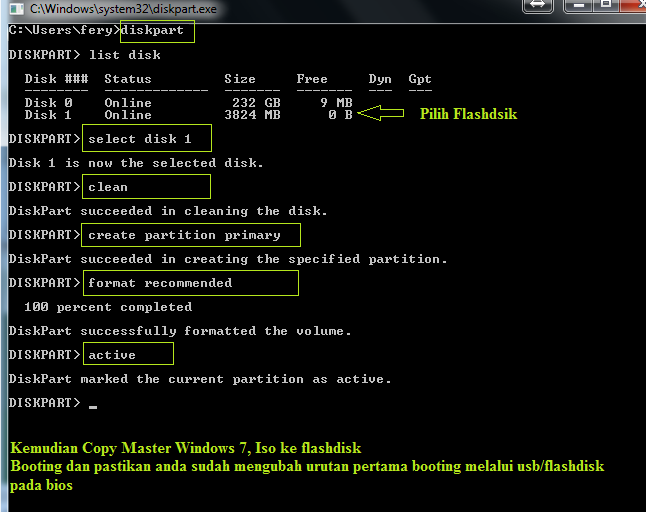
Trik ini sudah saya jalankan 100% berhasil.


![[belajar-excel-4-2.gif]](https://blogger.googleusercontent.com/img/b/R29vZ2xl/AVvXsEhHDxch86VirYdtqekHl7SopqL7ukd0y5redPbRQfI7VAW4bkjmNGoed9XDAac8Gzv_O_jp_GApqXVH2ImQTCaAEujxahvs7FeQzzhlfyd_EAOpfvqNPTZBztXcg5c3ecdkeZ6giIdBr58i/s1600/belajar-excel-4-2.gif)




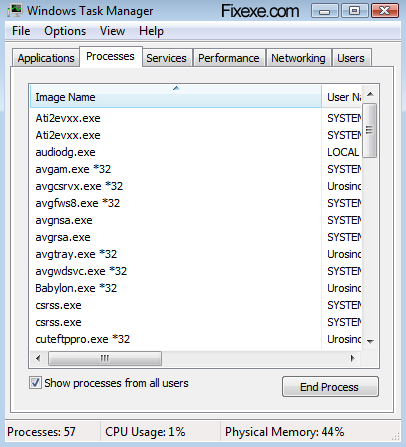 Normally when you open Task manger you would see a menu that has various options like File, Options, View and Help pull-down options and also different tabs to show details on Performance, Networking, Applications, Processes, Services and Users. There would be an instance when you will not be able to notice any of these menus and the various tabs will also be missing.


